
Handgeprüfte Gebrauchtware
Bis zu 50 % günstiger als neu
Der Umwelt zuliebe
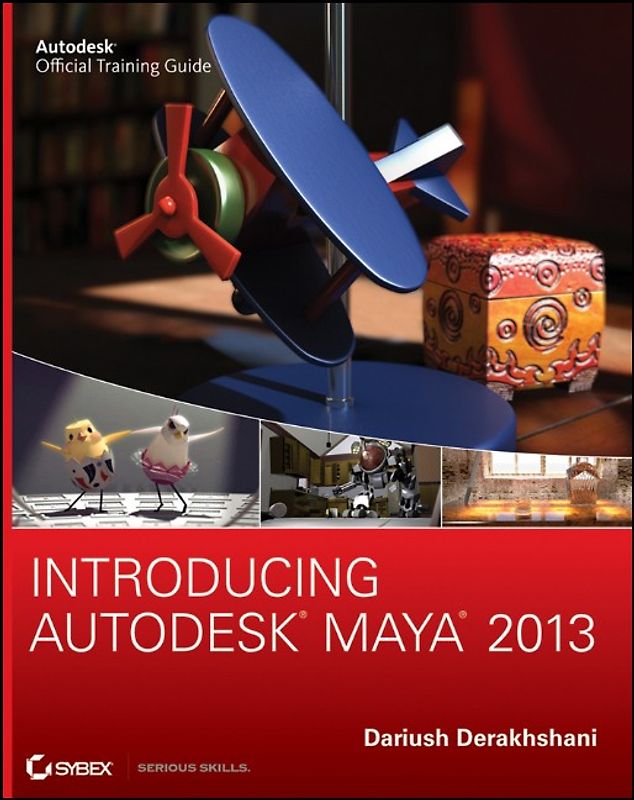
Introducing Autodesk Maya 2013
Dariush Derakhshani (Taschenbuch, Englisch)
Keine Bewertungen vorhanden
Optischer Zustand
Sichtbare Gebrauchsspuren auf einzelnen Seiten z. B. umfangreiche Markierungen/Notizen, ausgefranste Kanten des Buchumschlags, Wasserschäden, deutliche Verformung des gesamten Buches sowie größere Verschmutzungen durch mehrmaligem Gebrauch Könnte ein Mängelexemplar sein oder ein abweichendes Cover haben (z. B. Clubausgaben) Gut für den Eigenbedarf geeignet
Beschreibung
A complete update to the popular Autodesk Official Training Guide for Maya
Maya is the industry-leading 3D animation and effects software used in movies, visual effects, games, cartoons, and other animation. This bestselling, official guide is a must for 3D beginners who want a thorough grounding in this dynamic and complex software. Fully updated for the newest version of Maya, the book explains 2,69 €
zzgl.
zzgl.
Handgeprüfte Gebrauchtware
Bis zu 50 % günstiger als neu
Der Umwelt zuliebe
Technische Daten
Erscheinungsdatum
26.04.2012
Sprache
Englisch
EAN
9781118130568
Herausgeber
John Wiley & Sons
Sonderedition
Nein
Autor
Dariush Derakhshani
Seitenanzahl
648
Einbandart
Taschenbuch
Autorenporträt
Dariush Derakhshani is an award-winning visual effects supervisor, author, and educator. He has worked on movies such as The Fantastic Four and Pan's Labyrinth, the South Park TV series, and countless commercials and music videos. He teaches Maya and 3D animation, and is the author of all the Introducing Maya books, as well as coauthor of Autodesk 3ds Max 2012 Essentials and Autodesk 3ds Max 2013 Essentials.
Schlagwörter
End-User Computing, Maya (Programm), Graphik- u. Designsoftware (außer Microsoft), Graphics & Design software (Non-Microsoft), Computer-Ratgeber
Thema-Inhalt
UG - Grafische und digitale Media-Anwendungen
Inhaltsverzeichnis
Introduction xvii
Chapter 1 Introduction to Computer Graphics and 3D 1
Art? 2
Computer Graphics 2
The Stages of Production 4
The CG Production Workflow 8
Core Concepts 10
Basic Film Concepts 21
Summary 26
Chapter 2 Jumping in Headfirst, with Both Feet 27
You Put the U in UI 28
Project Overview: The Solar System 33
The Preproduction Process: Planning 33
Creating a Project 34
The Production Process: Creating and Animating the Objects 36
Hierarchy and Maya Object Structure 49
The Solar System Resumed 52
Outputting Your Work: Playblasting 60
Summary 62
Chapter 3 The Autodesk Maya 2013 Interface 63
Navigating in Maya 64
Exploring the Maya Layout 64
Building a Decorative Box 78
Mapping the Box's Reference Planes with Hypershade 82
Organizing Workflow with Layer Editor 86
Modeling the Decorative Box 88
Editing the Decorative Box Model Using the Shelf 94
Continuing the Decorative Box Model 99
Finishing the Decorative Box Model 102
Summary 109
Chapter 4 Beginning Polygonal Modeling 111
Planning Your Model 112
Polygon Basics 114
Poly Editing Tools 116
Putting the Tools to Use: Making a Simple Hand 120
Creating Areas of Detail on a Poly Mesh 127
Modeling a Catapult 134
Suggestions for Modeling Polygons 156
Summary 156
Chapter 5 Modeling with NURBS, Subdivisions, and Deformers 157
NURBS! NURBS! 158
Using NURBS Surfacing to Create Polygons 170
Converting a NURBS Model to Polygons 172
Editing NURBS Surfaces 173
Patch Modeling: A Locomotive Detail 175
Using Artisan to Sculpt NURBS 187
Modeling with Simple Deformers 189
The Lattice Deformer 193
Animating Through a Lattice 197
Subdivision Surfaces 200
Creating a Starfish 200
Building a Teakettle 205
Summary 213
Chapter 6 Practical Experience 215
Evaluating the Table Lamp 216
Modeling the Base 217
Creating the Lamp Stem 219
Modeling the Lampshade 231
Making the Toy Airplane 236
Using References 263
Finishing the Toy Airplane 265
Updating the Reference 268
Summary 269
Chapter 7 Autodesk Maya Shading and Texturing 271
Maya Shading 272
Shader Types 272
Shader Attributes 276
Texturing the Table Lamp 280
Textures and Surfaces 286
Textures and UVs for the Red Wagon 293
Photo-real Mapping: The Decorative Box 327
For Further Study 344
Summary 344
Chapter 8 Introduction to Animation 347
Keyframe Animation--Bouncing a Ball 348
Throwing an Axe 359
Replacing an Object 376
Animating Flying Text 377
Rigging the Locomotive, Part 1 382
Animating the Catapult 385
Summary 390
Chapter 9 More Animation! 393
Skeletons and Kinematics 394
Skeletons: The Hand 407
Inverse Kinematics 422
Basic Relationships: Constraints 427
Basic Relationships: Set-Driven Keys 432
Application: Rigging the Locomotive 435
Summary 442
Chapter 10 Autodesk Maya Lighting 443
Basic Lighting Concepts 444
Maya Lights 448
Light Linking 454
Adding Shadows 455
Raytracing Soft Shadows 459
mental ray Lighting 460
mental ray Physical Sun and Sky 462
Lighting Effects 467
Lighting the Table Lamp and Decorative Box 471
Further Lighting Practice 477
Tips for Using and Animating Lights 478
Summary 480
Chapter 11 Autodesk Maya Rendering 481
Rendering Setup 482
Previewing Your Render: The Render View Window 491
Reflections and Refractions 493
Using Cameras 495
Motion Blur 501
Batch Rendering 501
Rendering the Wine Bottle 502
mental ray for Maya 506
Render Layers 511
Final Gather 520
Ambient Occlusion 523
HDRI 530
Displacement Mapping the Decorative Box 532
Rendering the Lamp and Decorative Box 540
Summary 550
Chapter 12 Autodesk Maya Dynamics and Effects 551
An Overview of Dynamics and Maya Nucleus 552
Rigid and Soft Dynamic Bodies 552
Animating with Dynamics: The Pool Table 556
Fun Dynamics: Shoot the Catapult! 565
nParticle Dynamics 568
Emitting nParticles 568
Animating a Particle Effect: Locomotive Steam 574
Introduction to Paint Effects 580
Toon Shading 584
Customizing Maya 587
Summary 591
Where Do You Go from Here? 591
Index 593
Höhe
229 mm
Breite
18.7 cm
-.-
Leider noch keine Bewertungen
Leider noch keine Bewertungen
Sicher bei rebuy kaufen

Schreib die erste Bewertung für dieses Produkt!
Wenn du eine Bewertung für dieses Produkt schreibst, hilfst du allen Kund:innen, die noch überlegen, ob sie das Produkt kaufen wollen. Vielen Dank, dass du mitmachst!
Sicher bei rebuy kaufen